Online store redesign for a gourmet ingredient distributor
Redesign proposal for the online store of a Canadian gourmet ingredient distributor that sells to home cooks as well as restaurants, bakeries and bars. We put the catalog in plain view, grouped each product’s formats with their unit price and brought the wholesale program to where the purchase decision is made.
Client
Canadian gourmet ingredient distributor
Project
Online store redesign
Scope
Home page, menu, product listing and product page, on desktop and mobile
Status
Redesign proposal, not implemented
Role
UX/UI design
UX/UI
Information architecture
Accessibility
01 · The starting point
A catalog of 2,438 products for two different customers
Qualifirst is a family business that has imported gourmet ingredients into Canada since 1957, with warehouses in Toronto and Vancouver. Its online store brings together 2,438 products, from spices and couverture chocolate to bitters and kitchenware, and sells at once to home cooks and to restaurants, bakeries and bars, which can buy at wholesale prices.
The current website has the information needed to buy well: formats, dietary badges, shipping terms and benefits for professionals. The problem is where it is. Navigation hides behind a menu, formats of the same product appear as separate products and the benefits for professionals are scattered between the shipping terms and the footer.
The proposal doesn’t touch the catalog: it reorganizes it so each customer finds what they need without leaving the page where they’re shopping.
02 · The diagnosis
Nine problems, from navigation to mobile
Before designing, we reviewed the website on desktop, at 1440 px, and on mobile, at 375 px: the home page, the menu, the shop, the eleven categories, the Bitters subcategory, search, collections, a product page in both its formats, account sign-up, recipes, the blog, shipping terms and FAQs. The problems fall into nine points, and each one has its answer in the proposal.
Before · current website
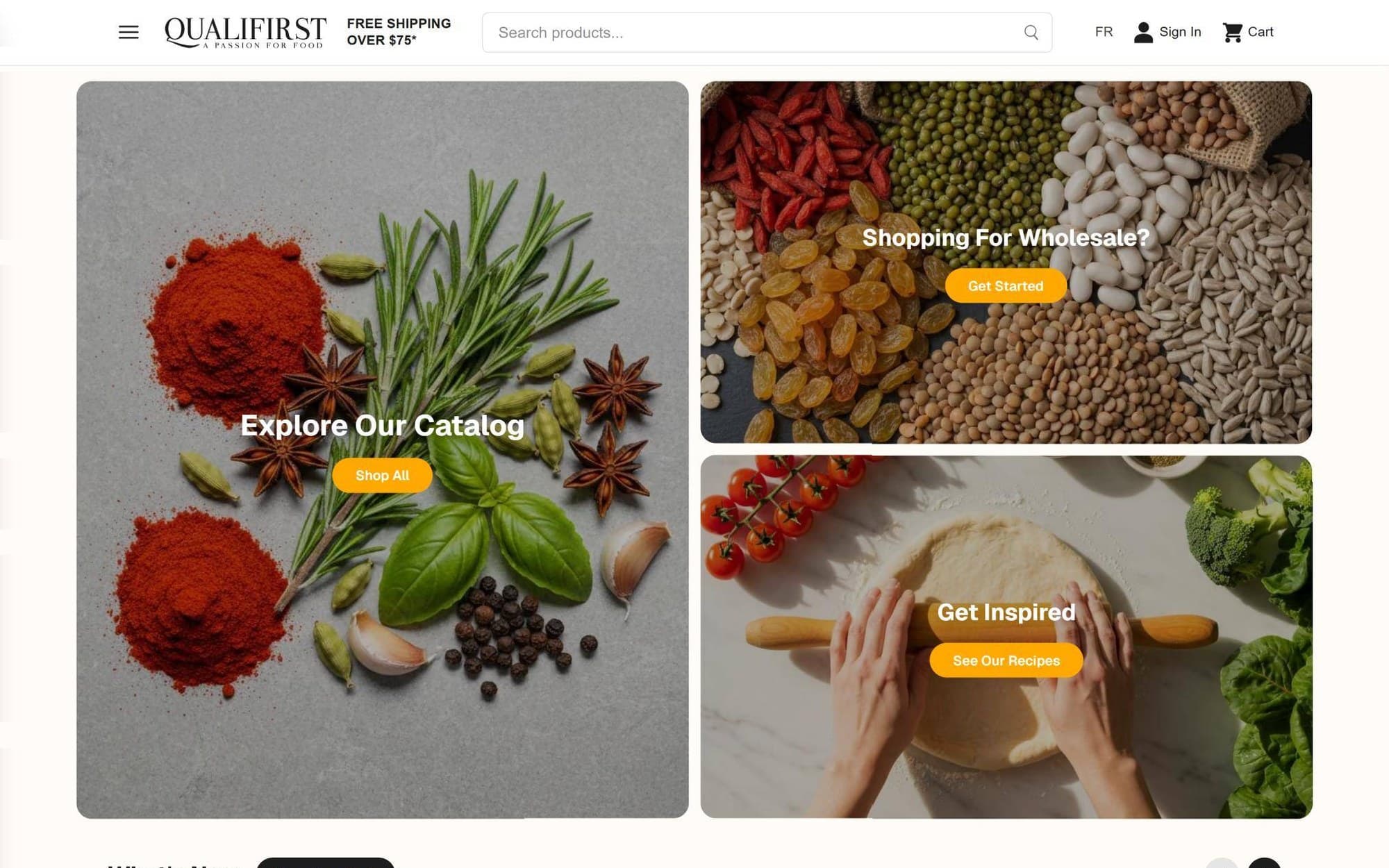
The home page: three cards of equal weight and no headline.
Before · current website
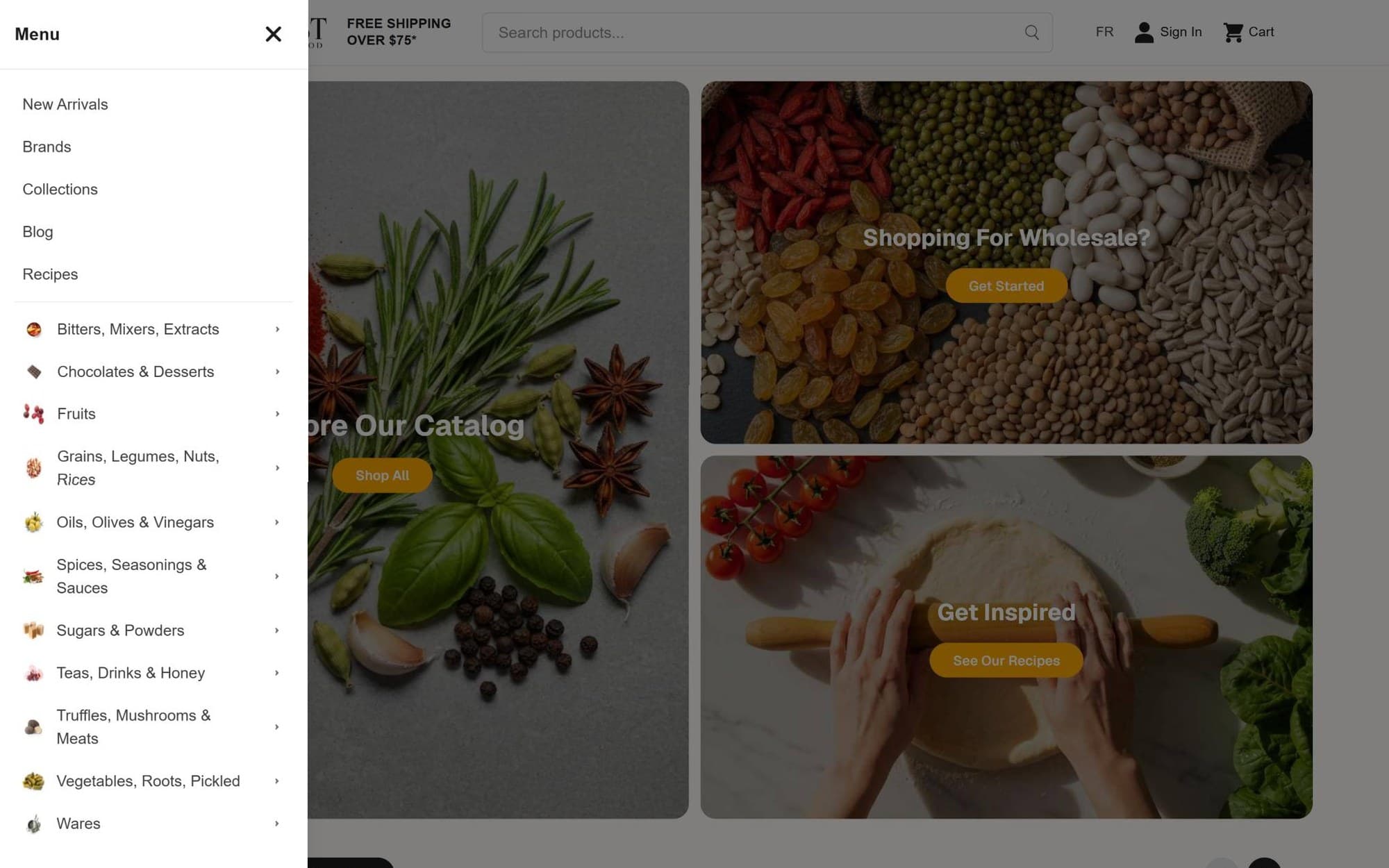
The menu, on desktop too, behind an icon: 16 items.
Diagnosis of the current website
Area
What happens
Proposal’s answer
Navigation
On desktop, navigation hides behind a menu icon: 16 items and an accordion up to three levels deep. The 11 categories sit at the same level, from 49 to 541 products
Always-visible navigation with four groups, a wide search bar and a dropdown menu with the subcategories
Home page
No headline or value proposition. Section titles are 16 px, the same size as the body text
A single H1 that says what is sold and to whom, two calls to action and a service strip
Catalog
2,438 products without a single filter, neither in categories nor in search
Filters by brand, diet, origin, format and price, with the number of products for each option
Formats
Each format is a separate product: in Bitters, 80 entries for 46 products
Each product’s formats, grouped in the listing and on the product page
Price
There’s no unit price. Nothing says the case of twelve works out 24% cheaper per bottle
Price per 100 g or 100 ml for each format, and the case savings, calculated
Product page
Breadcrumbs don’t include the category. There’s no delivery time or pickup next to the button, and dietary badges sit at the end of the description
Breadcrumbs with group and subcategory; shipping, delivery and pickup next to the button; badges at the top
Wholesale
“Shopping For Wholesale?” leads to the generic sign-up, with a single line of explanation
A fixed entry point in the header and the real benefits, with two paths (open an account or request a quote), on the home page and on the product page
Contrast
White text on the orange of the home page buttons: 1.93:1. Brands in orange on cream: 1.89:1
Buttons and links in dark coral: 5.35:1
Mobile
The header overflows and cuts off the cart, and “Add to Cart” breaks into four lines. In Bitters, the first product appears at 850 px
A header that fits, filters in a sheet, a two-column listing and the first product at 419 px
03 · Navigation
Eleven categories in four groups
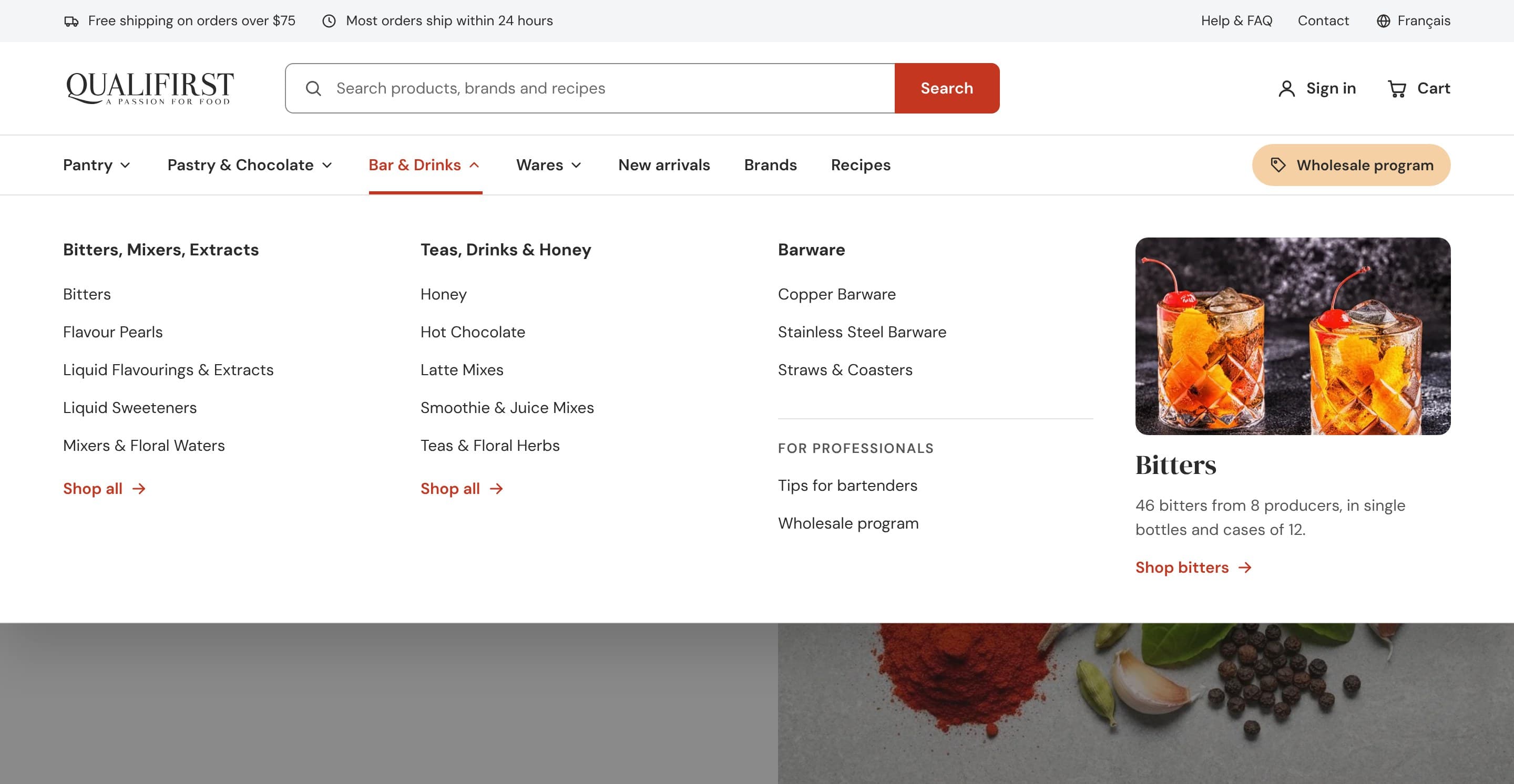
The website has eleven categories at the same level and of very different sizes, and on desktop they’re only visible when the menu is opened. The proposal doesn’t change the catalog: it groups the eleven categories into four entries by use (pantry, pastry and chocolate, bar and drinks, and kitchenware) and keeps them always in view, next to New arrivals, Brands, Recipes and a dedicated entry point for the wholesale program.
Pantry
Spices, Seasonings & Sauces
Oils, Olives & Vinegars
Grains, Legumes, Nuts, Rices
Vegetables, Roots, Pickled
Truffles, Mushrooms & Meats
Fruits
6 categories
Pastry & Chocolate
Chocolates & Desserts
Sugars & Powders
2 categories
Bar & Drinks
Bitters, Mixers, Extracts
Teas, Drinks & Honey
2 categories
Wares
Wares
1 category
Search also covers brands and recipes. Opening a group reveals its subcategories. In Bar & Drinks the bar tools also appear, which on the current website sit under Wares, plus a section for professionals.
The menu for Bar & Drinks: subcategories, bar tools and a section for professionals.
04 · The home page
A home page that says what is sold and to whom
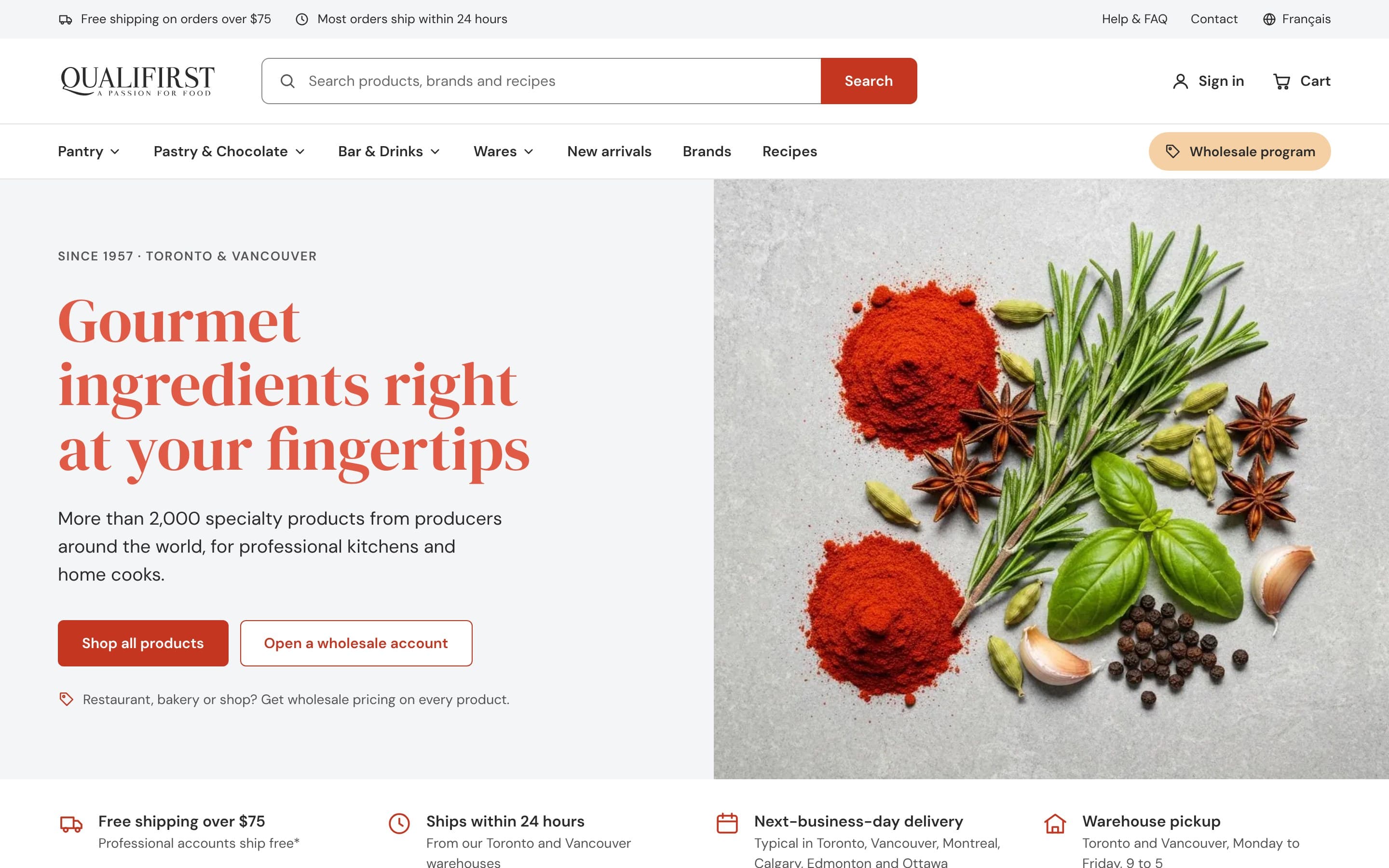
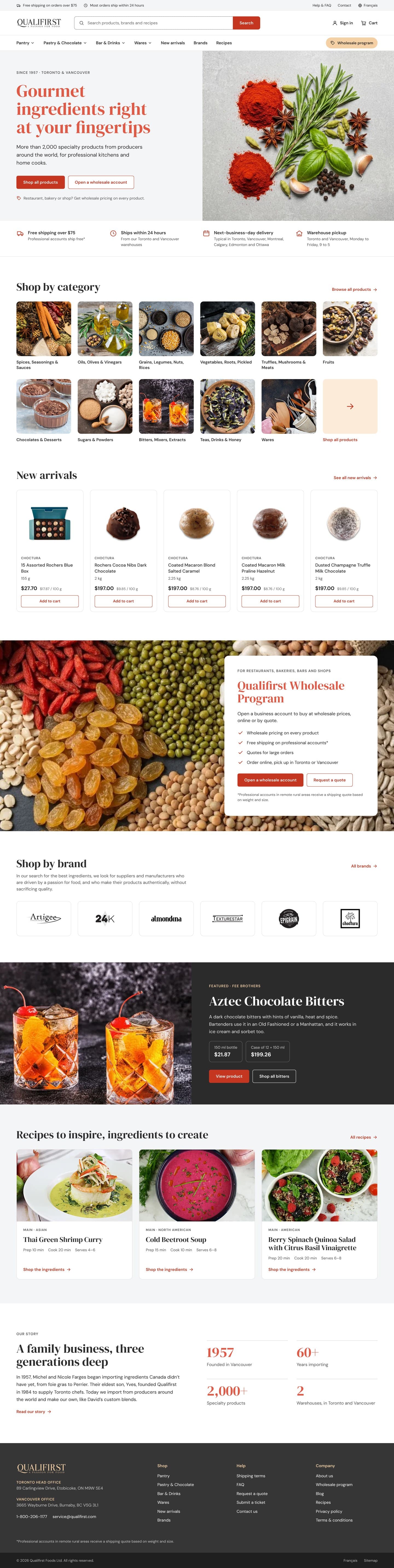
The current home page opens with three cards of equal weight (catalog, wholesale and recipes) and no headline. The new one starts with a single H1, “Gourmet ingredients right at your fingertips”, and a line that makes it concrete: over 2,000 products from around the world, for professional kitchens and home cooks. Below are two calls to action, one to shop and one to open a wholesale account, and a strip with what the company already offered and the home page didn’t say: most orders ship within 24 hours, delivery usually arrives the next business day in six cities, and orders can be picked up at the Toronto and Vancouver warehouses.
01
Header. Shipping and help at the top; wide search bar, visible navigation and wholesale access.
02
Hero. A single headline and two calls to action: shop or open an account.
03
Service. Shipping, delivery and pickup, with their terms.
04
Categories. All eleven, with photos, and a link to the full catalog.
05
New arrivals. Each product with its format and unit price.
06
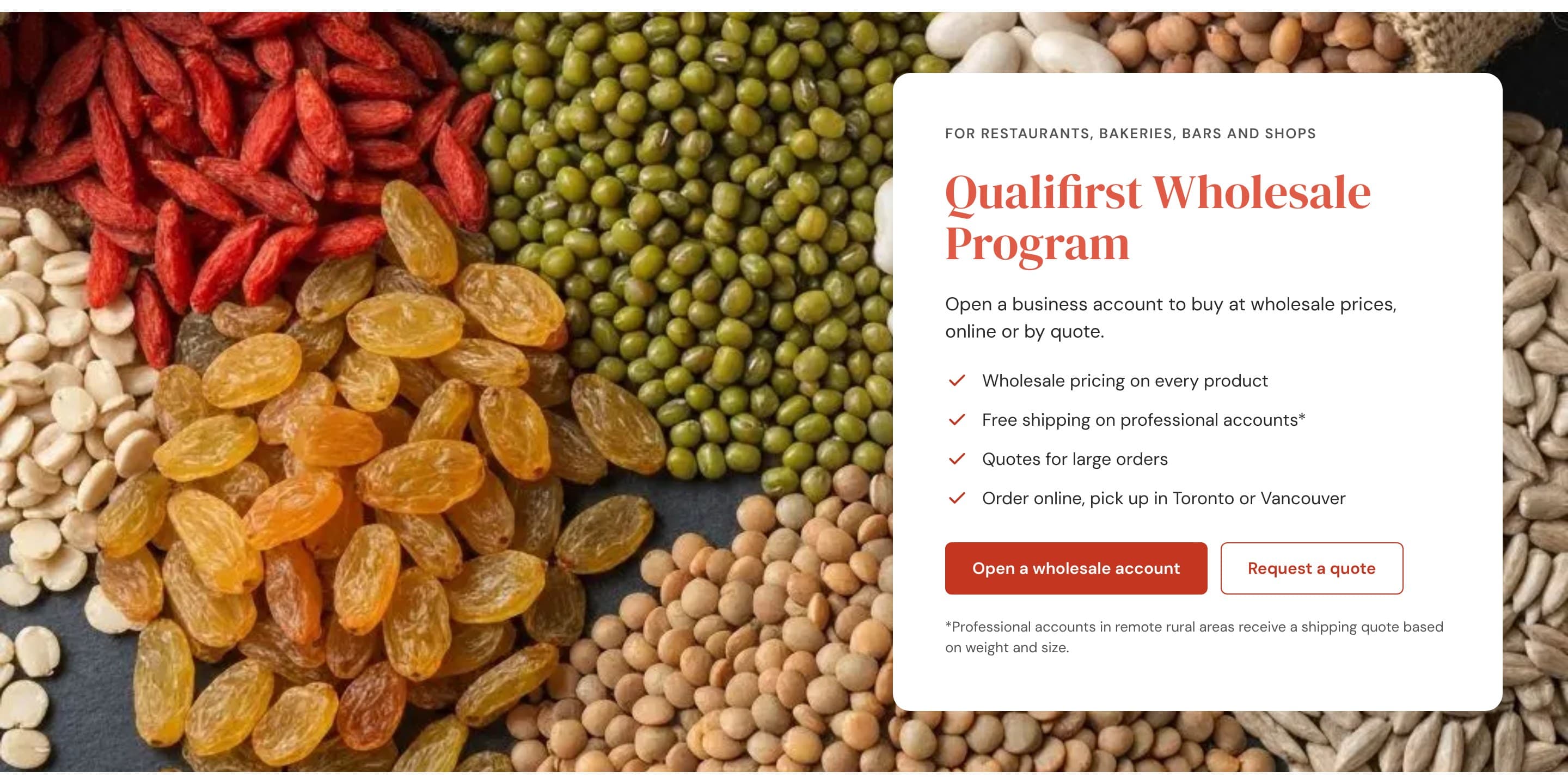
Wholesale program. Four benefits and two calls to action.
07
Brands. Six producers and a link to all of them.
08
Featured. One product with its two formats and its price.
09
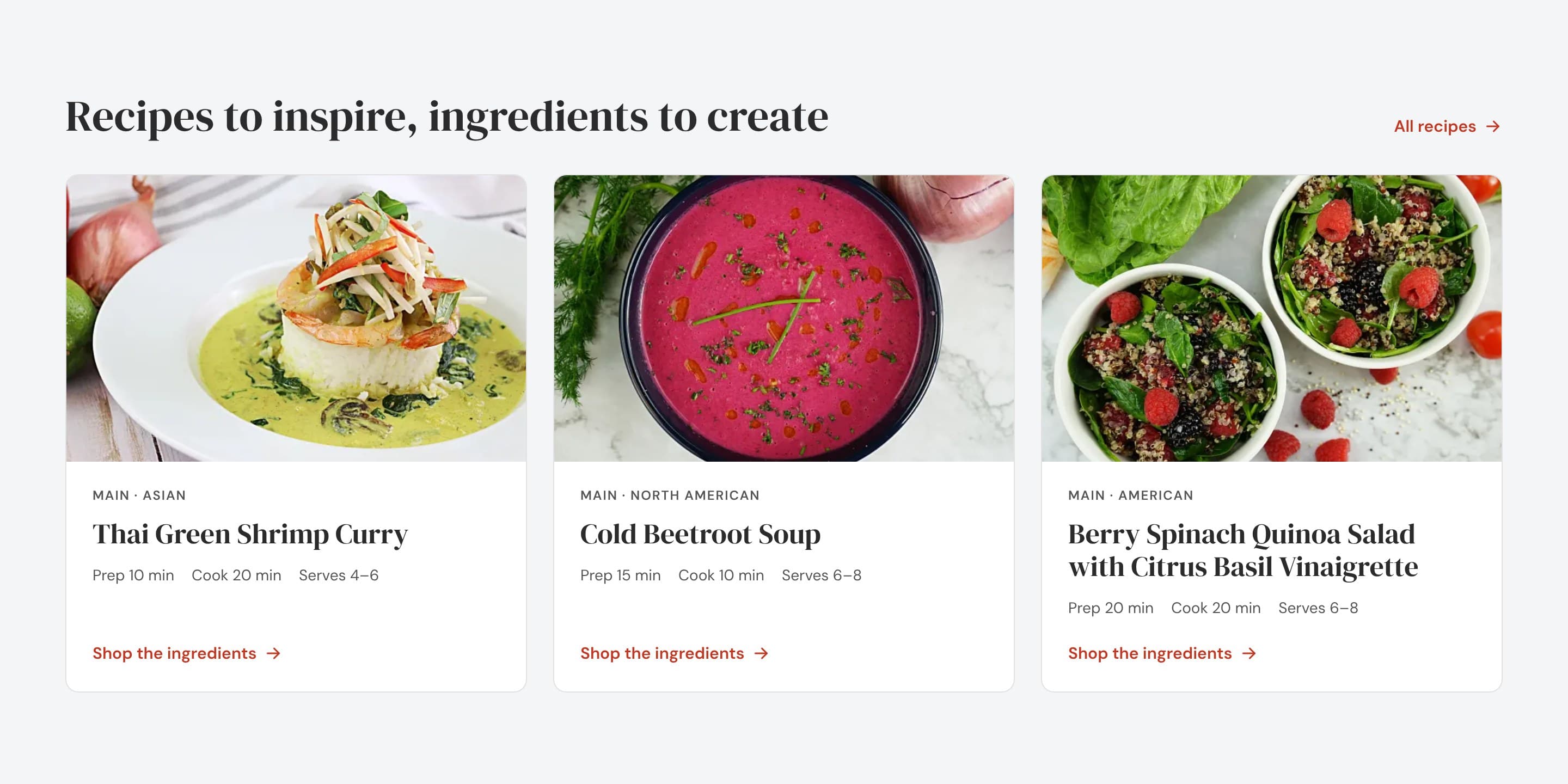
Recipes. Times, servings and a link to the ingredients.
10
Story. The family business, with four figures.
11
Footer. Addresses, phone, help and quotes in one place.
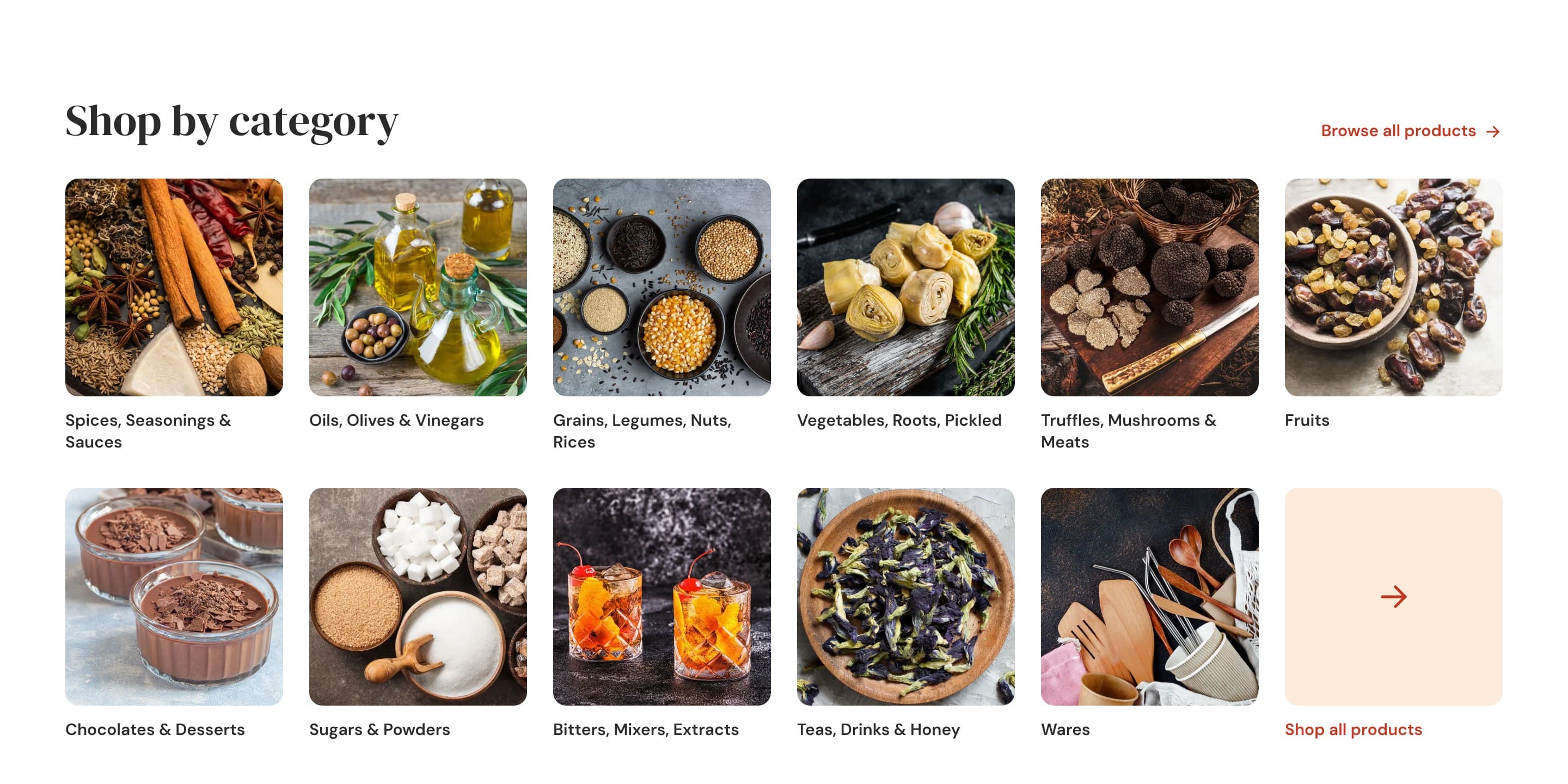
All eleven categories, in view
Each category has its photo and full name, and the last card leads to the full catalog. On the current home page they sit in a carousel that shows four at a time.
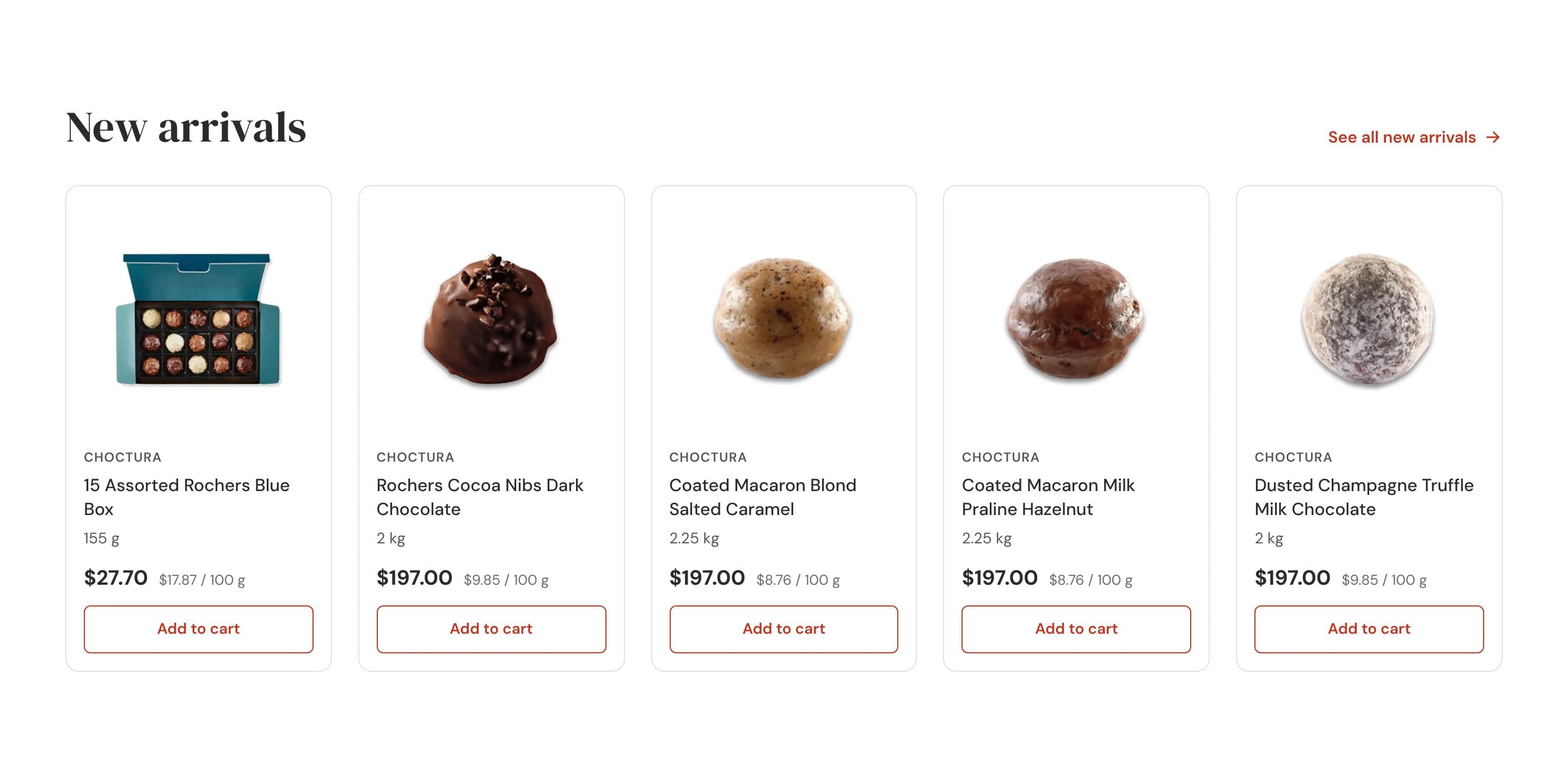
New arrivals with format and unit price
New arrivals are mostly food-service formats: 2 kg or 2.25 kg for $197. With the format and the price per 100 g in view, every customer knows what they’re looking at.
The wholesale program, explained
On the current website, “Shopping For Wholesale?” leads to a generic sign-up. This section lays out the four benefits the company already offers (wholesale pricing across the whole catalog, free shipping for business accounts, quotes and warehouse pickup) and gives two paths: open an account or request a quote.
Recipes that lead to the store
Each recipe shows its prep time, cook time and servings, without the internal codes that currently accompany the author’s name, and ends in “Shop the ingredients”.
05 · The listing
A listing built for comparing
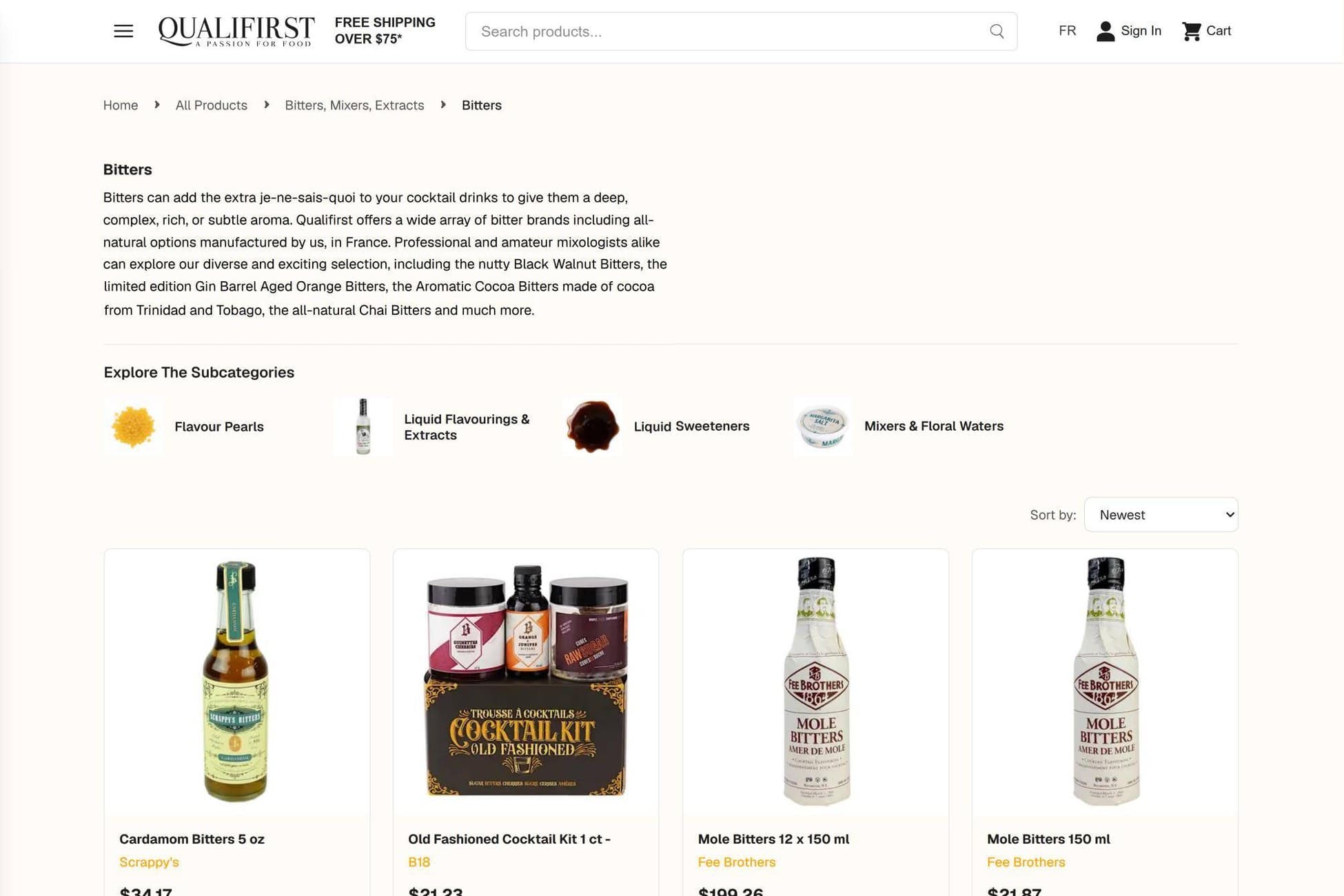
On the current website, Bitters has 80 entries because each format is a product: the 150 ml bottle and the case of twelve appear separately, each with its own name, photo and price. There are no filters or unit prices, and the page opens with a 16 px headline and a long paragraph.
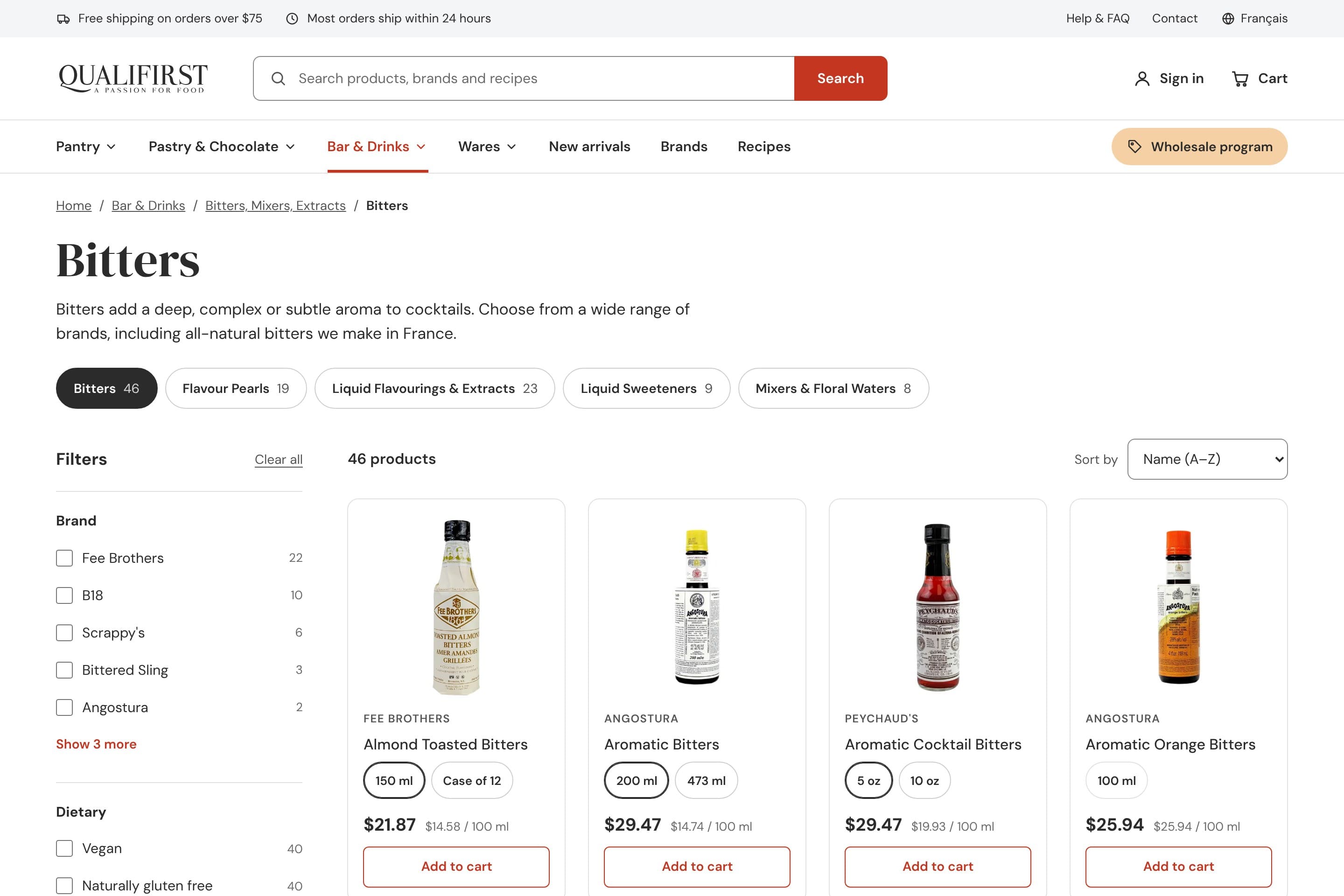
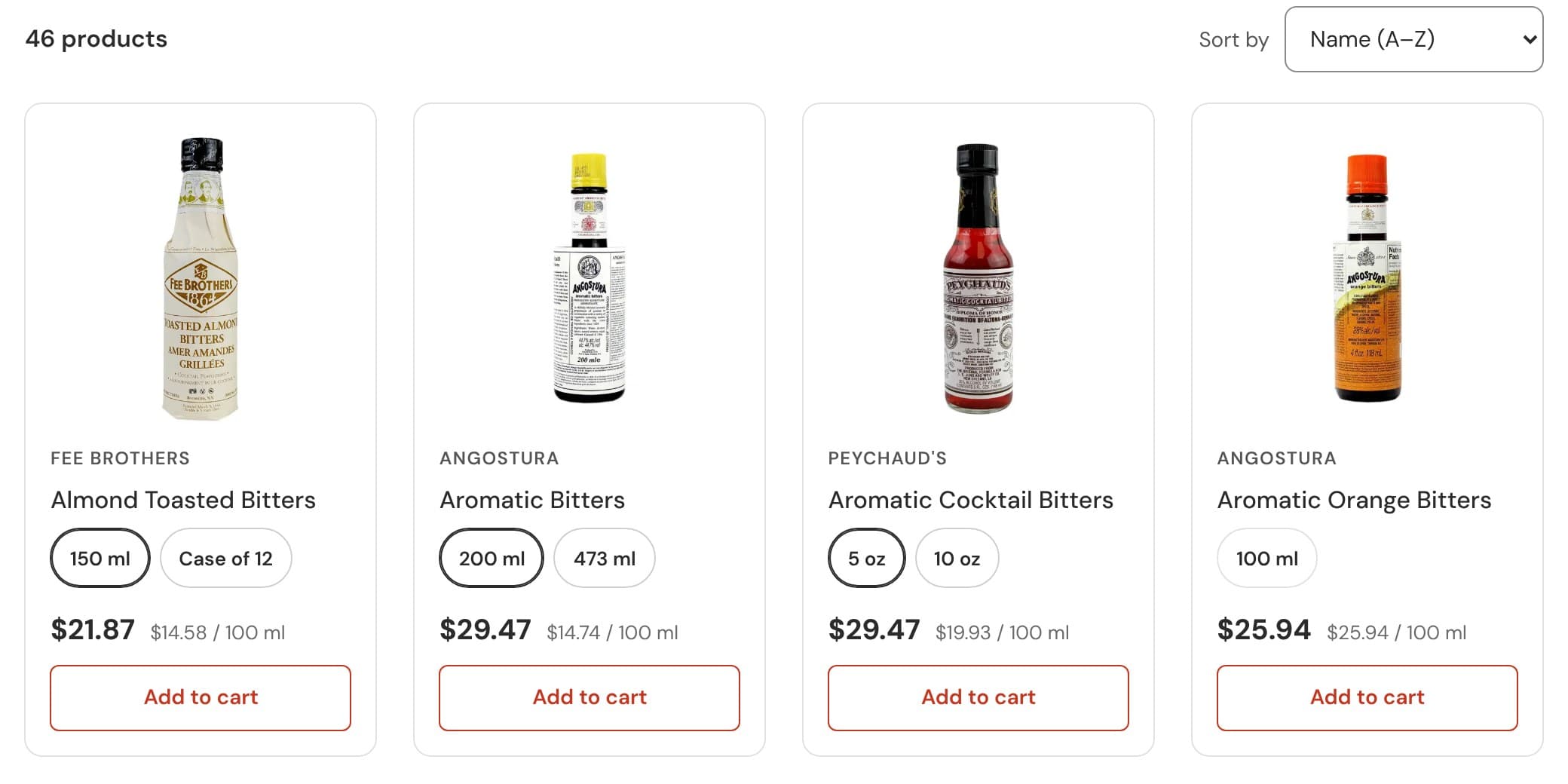
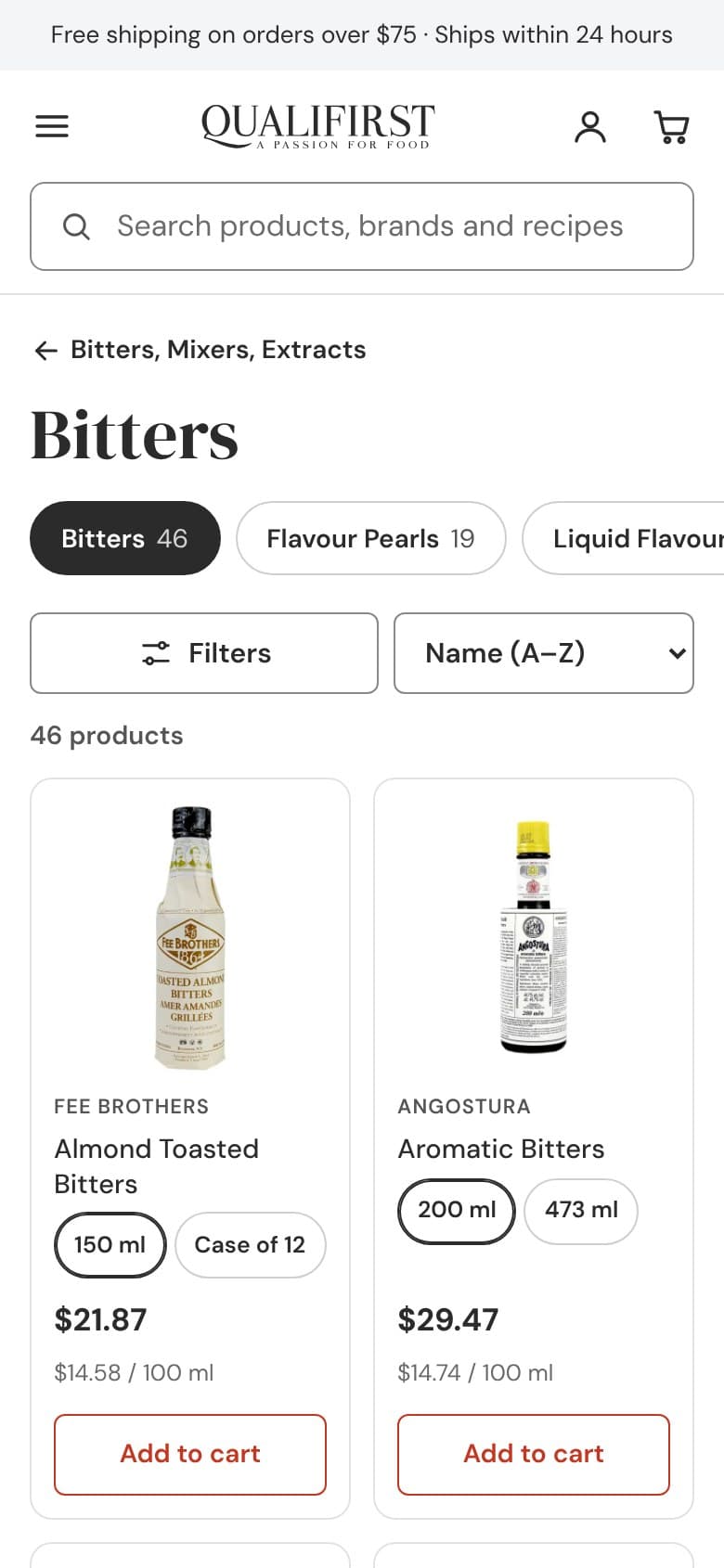
In the proposed listing, formats are grouped: 46 products, each with its sizes as options, its price and its price per 100 ml. On the left, filters by brand, diet, origin, format and price, with the number of products for each option. At the top, sibling subcategories with their product counts. And at the end, instead of pagination, a counter and a button to load more products.
Before · current website
The Bitters subcategory: the case and the bottle of Mole Bitters, as two products.
Proposal
Filters on the left and the formats inside each card.
Each card, with its formats, its price and its price per 100 ml.
06 · The product page
Bottle or case, with the savings in view
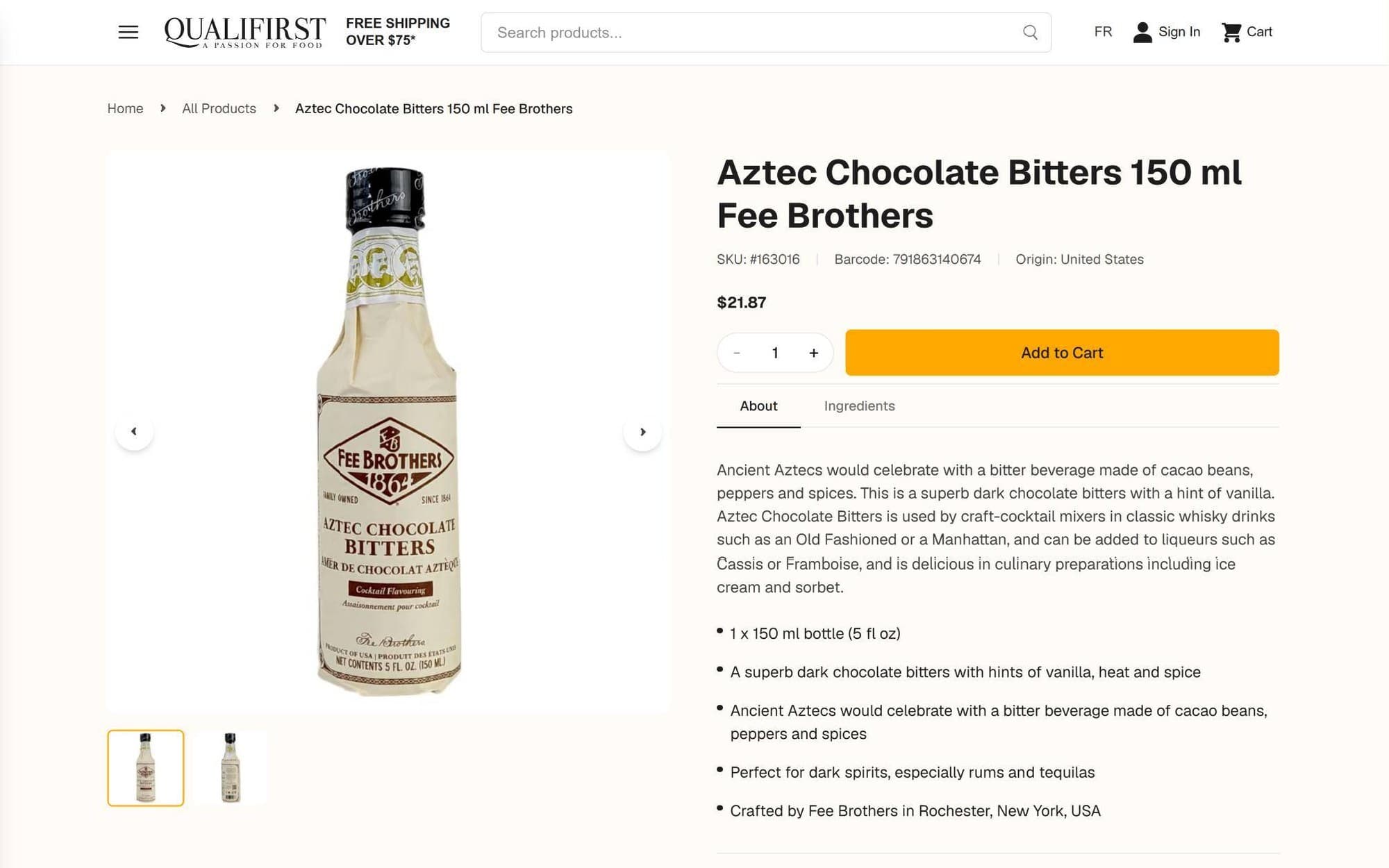
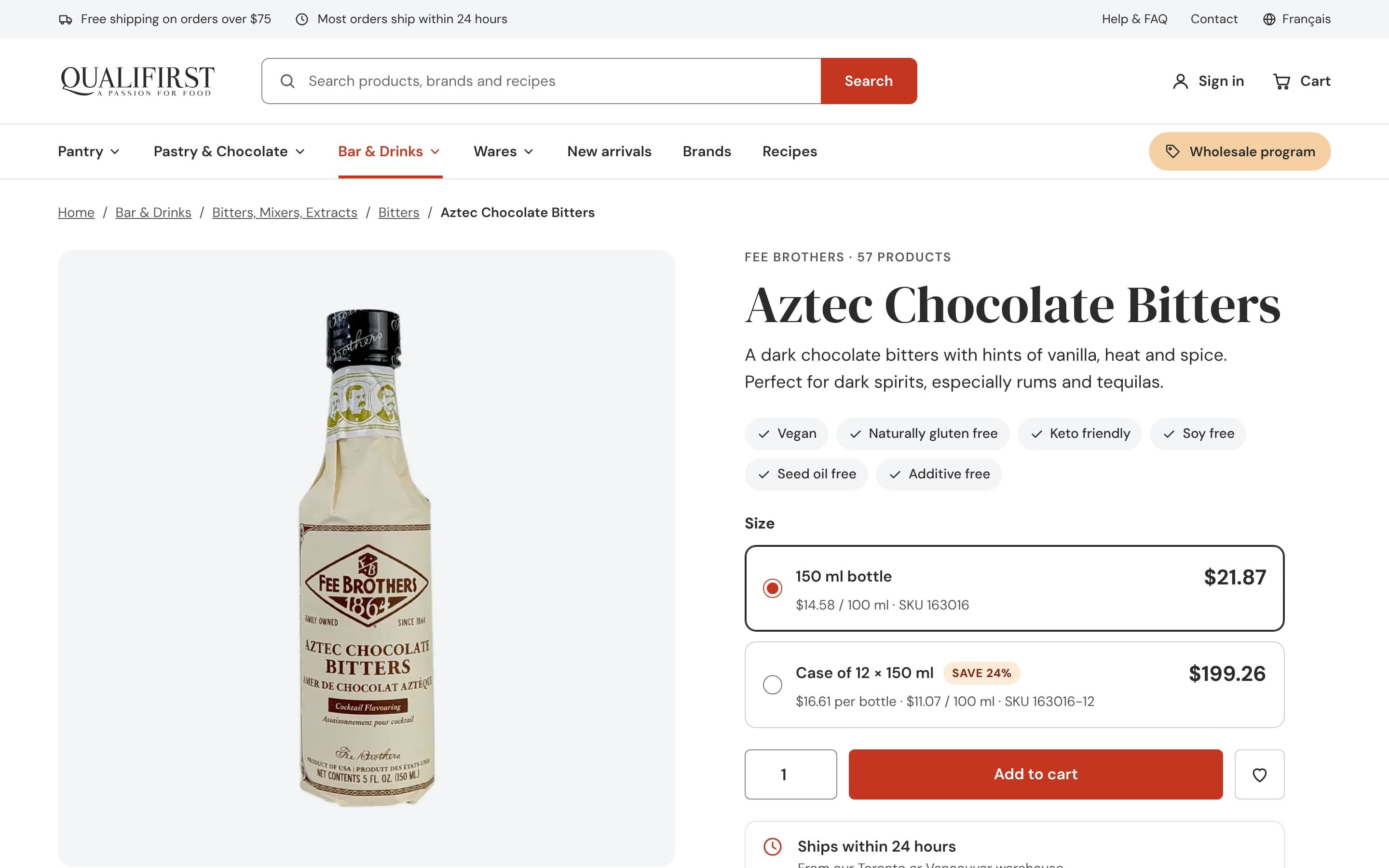
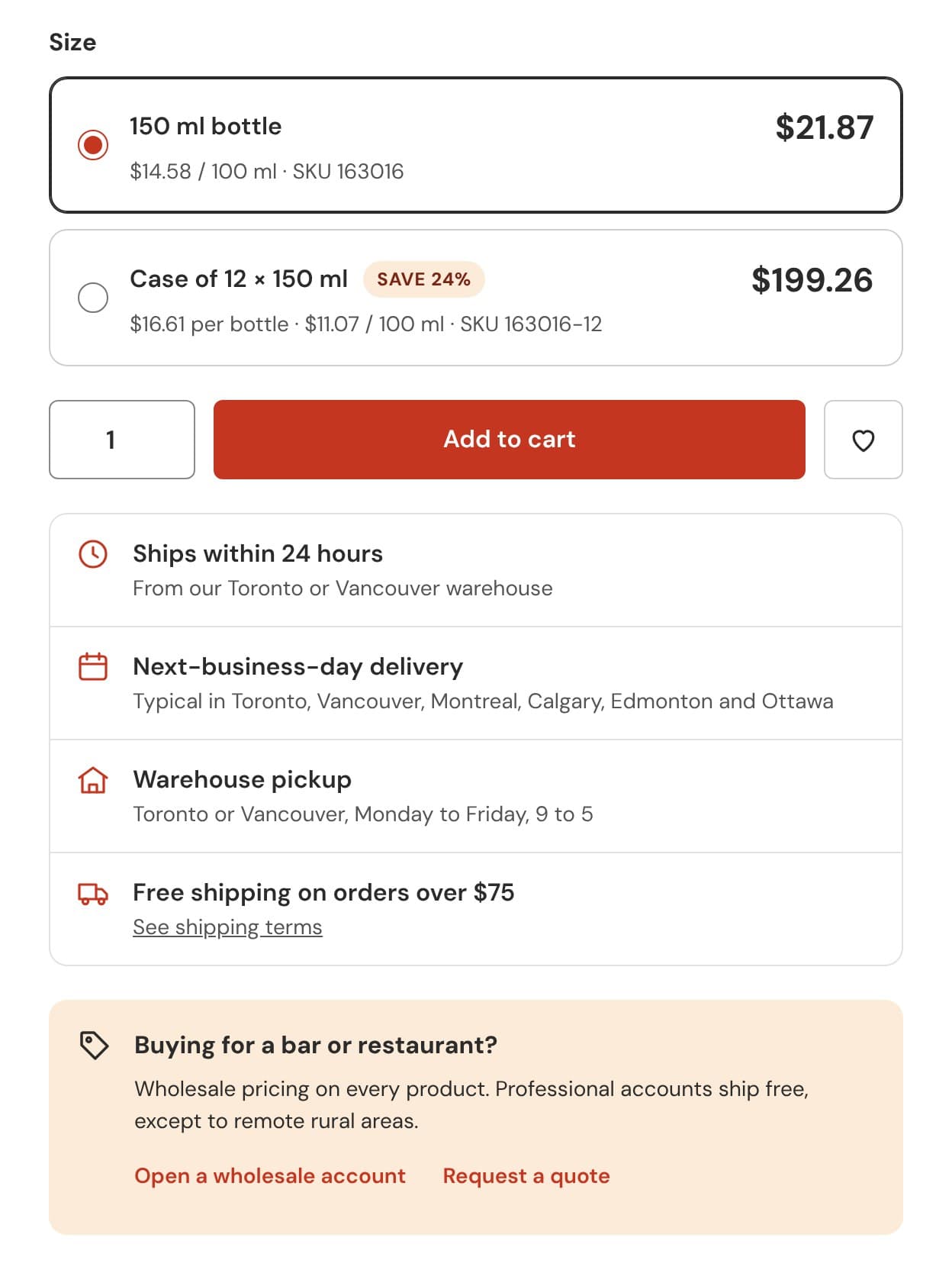
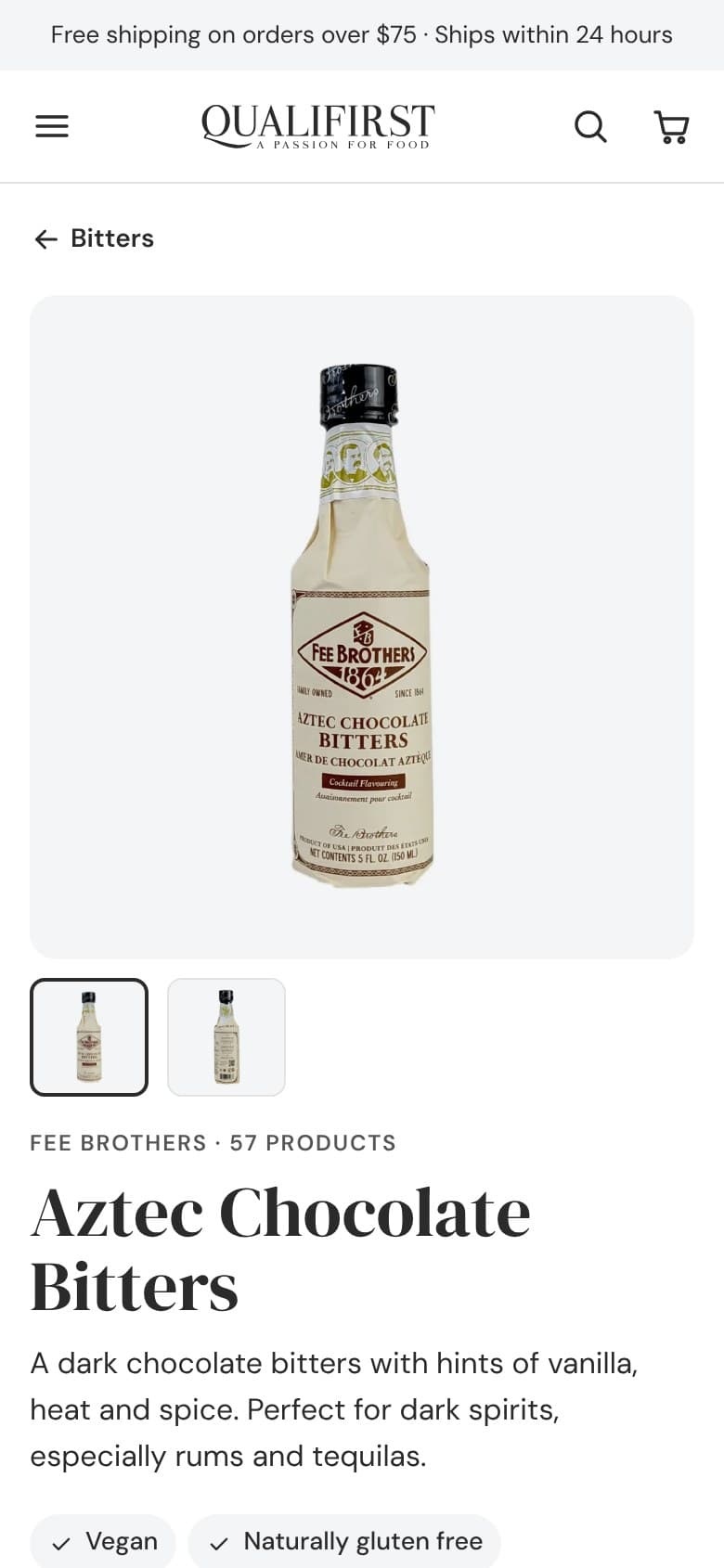
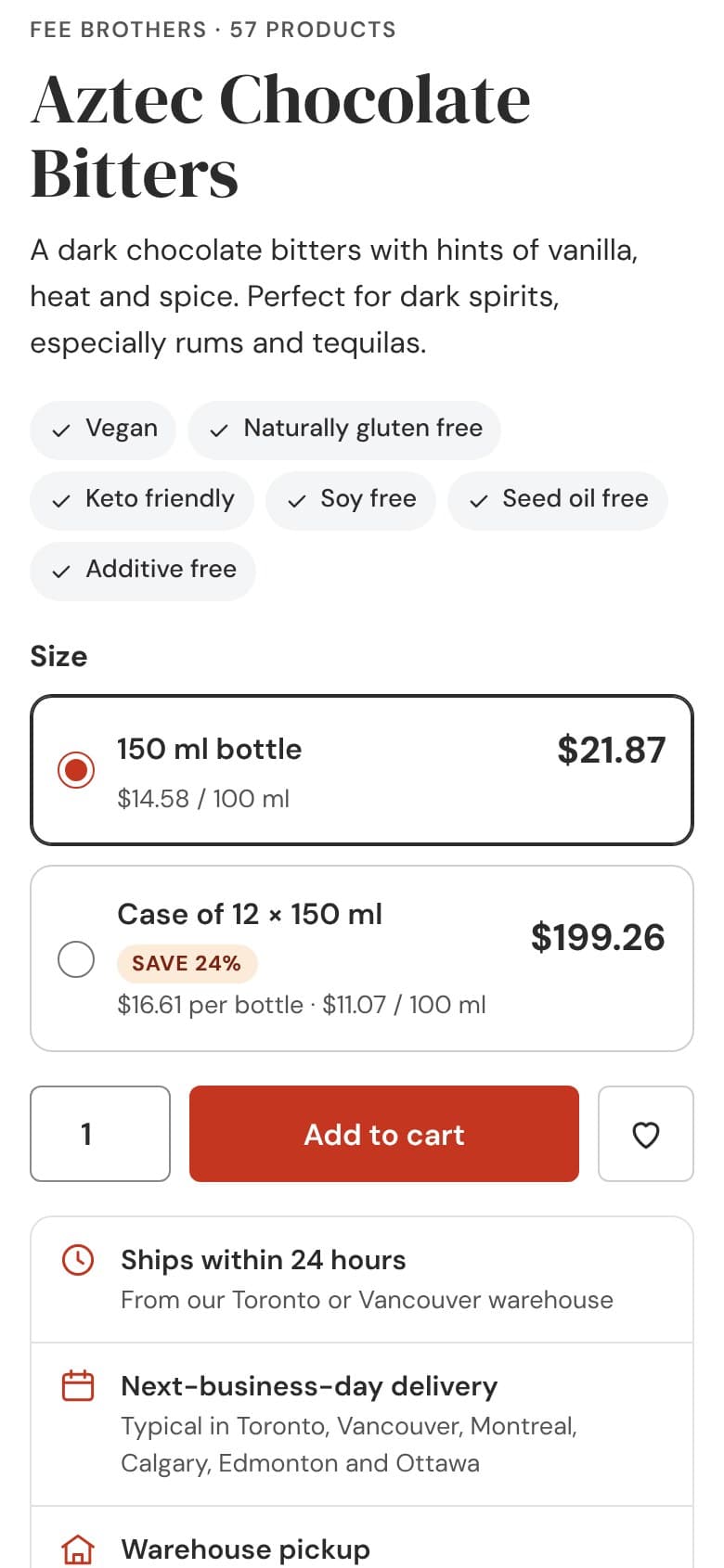
On the current website, the Aztec Chocolate Bitters bottle and the case of twelve are two separate product pages, and nothing indicates the case is cheaper. On the proposed product page they’re two options of the same purchase, each with its price, its price per 100 ml and its SKU. The case also shows what each bottle costs, $16.61 versus $21.87, and the savings: 24%.
Next to the button are shipping time, delivery and pickup. Dietary badges move up to the first screen, breadcrumbs regain the group and subcategory, and a box explains to professionals what they gain with a wholesale account. The product page ends with products that pair with this one.
Before · current website
A single format per page and nothing about delivery next to the button.
Proposal
The bottle and the case, as options of the same purchase.
The buy box: format, quantity, delivery and wholesale access.
The two formats are options on the same product page, each with its own SKU.
The price per 100 ml makes it possible to compare formats and brands.
The case says how much each bottle costs and how much you save.
Shipping, delivery and pickup, next to the buy button.
Professionals have their own box, with access to quotes.
07 · Mobile
A mobile experience that gets to the product sooner
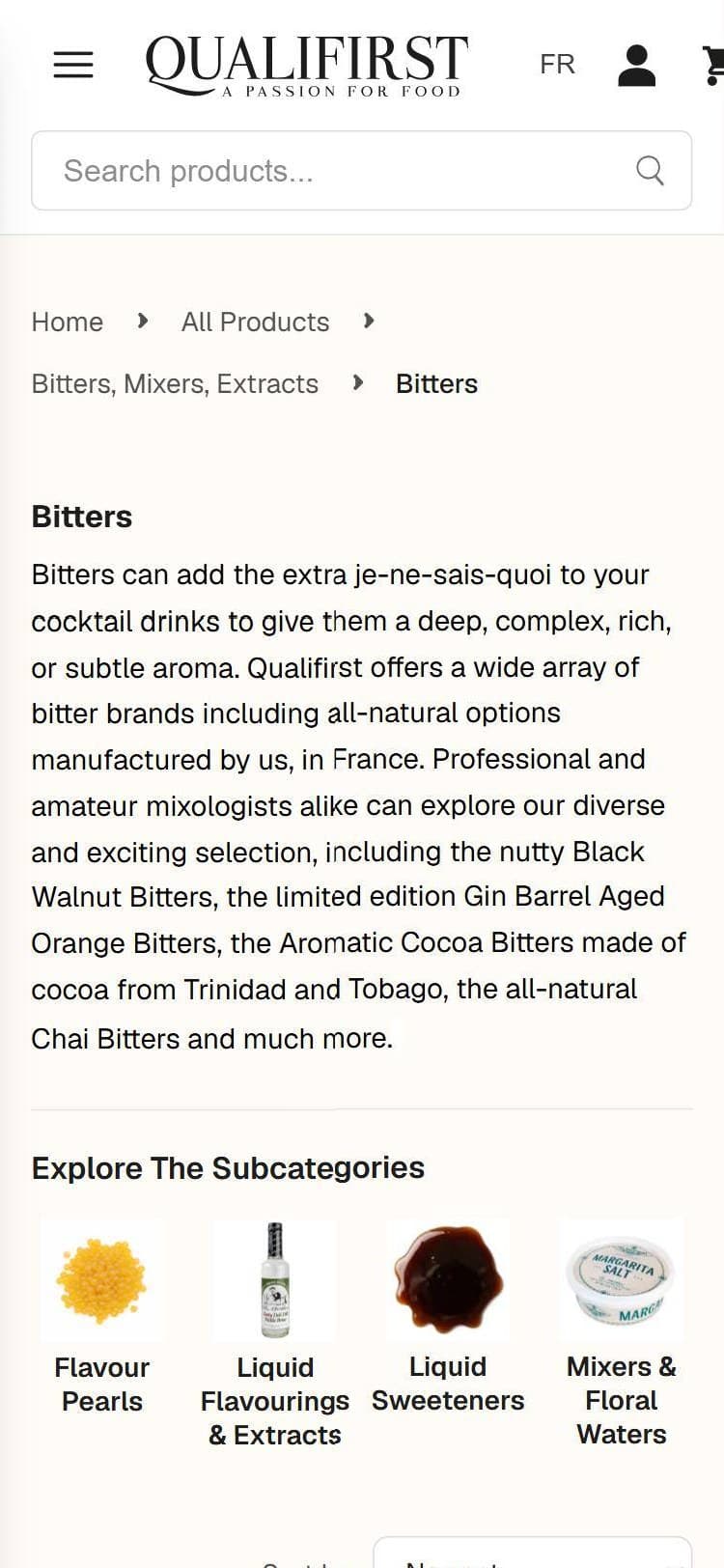
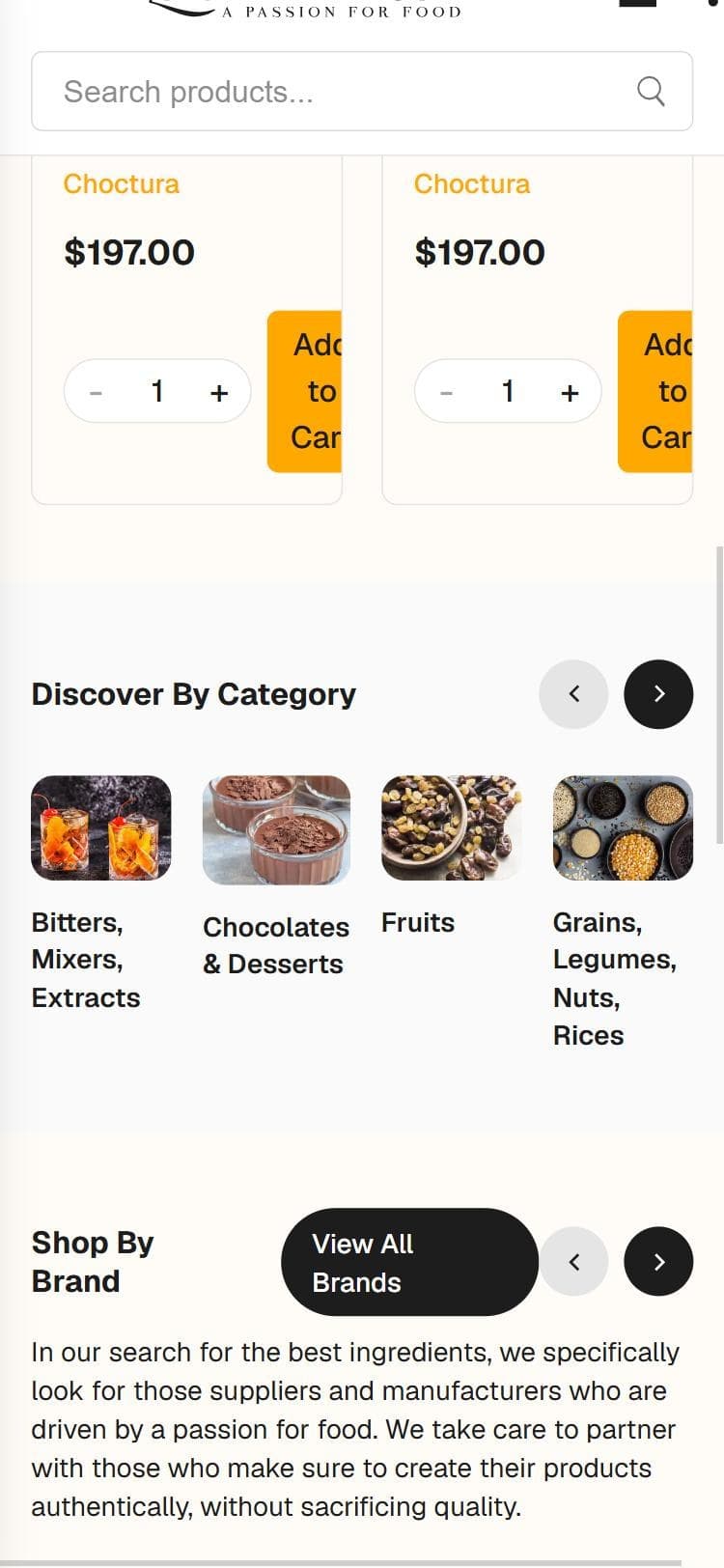
On a 375 px phone, the current website spills off the screen: the header overflows and cuts off the cart, and on the home page cards the “Add to Cart” button breaks into four lines and spills out of the card. In Bitters, the first screen is taken up by breadcrumbs, headline, paragraph and subcategories: the first product appears at 850 px.
Before · current website
Bitters: no product on the first screen.Before · current website
Home page: the “Add to Cart” button, broken.
The mobile version of the proposal has its own decisions:
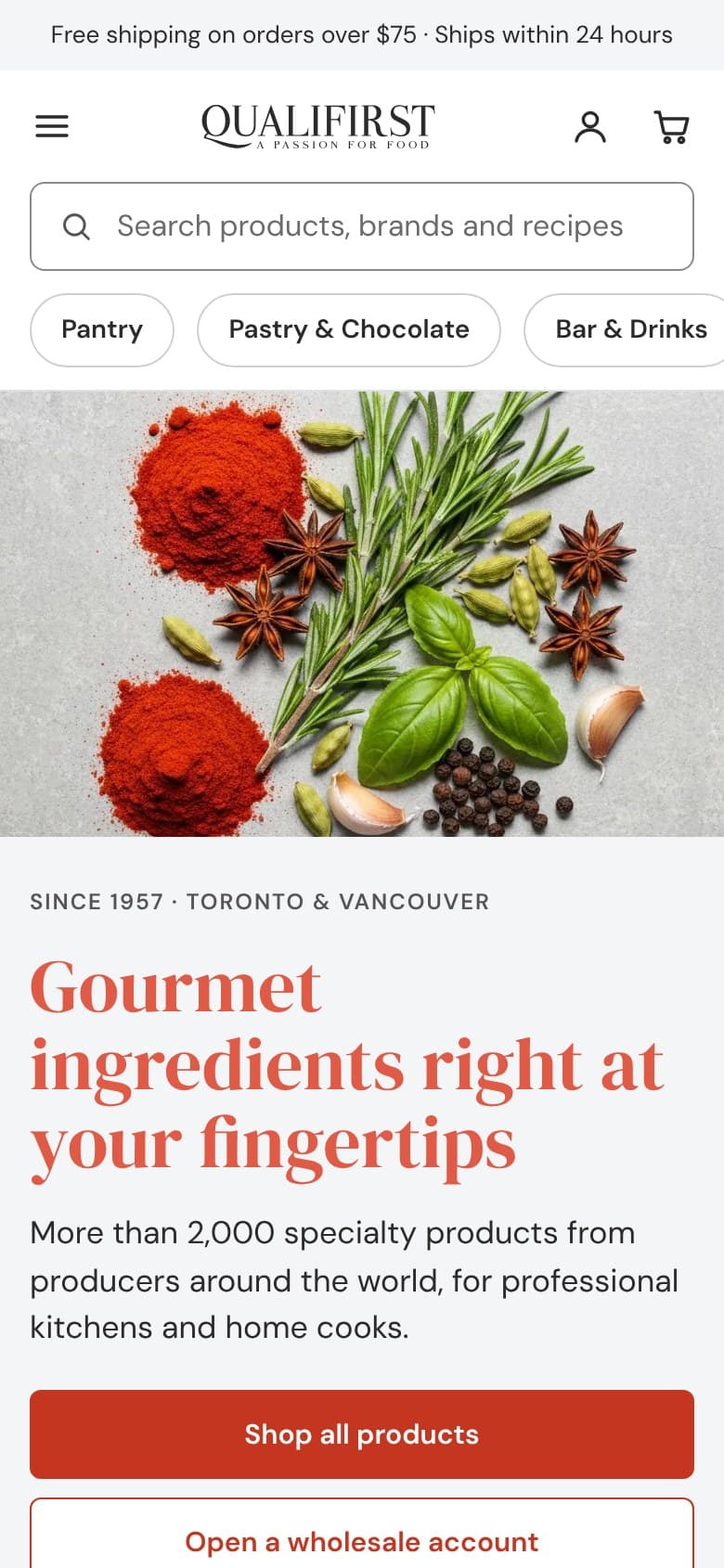
The header fits on the screen: menu, logo, account and cart, with the full-width search bar below.
The four navigation groups and wholesale access become buttons that scroll under the search bar.
The listing goes to two columns and the first product appears at 419 px.
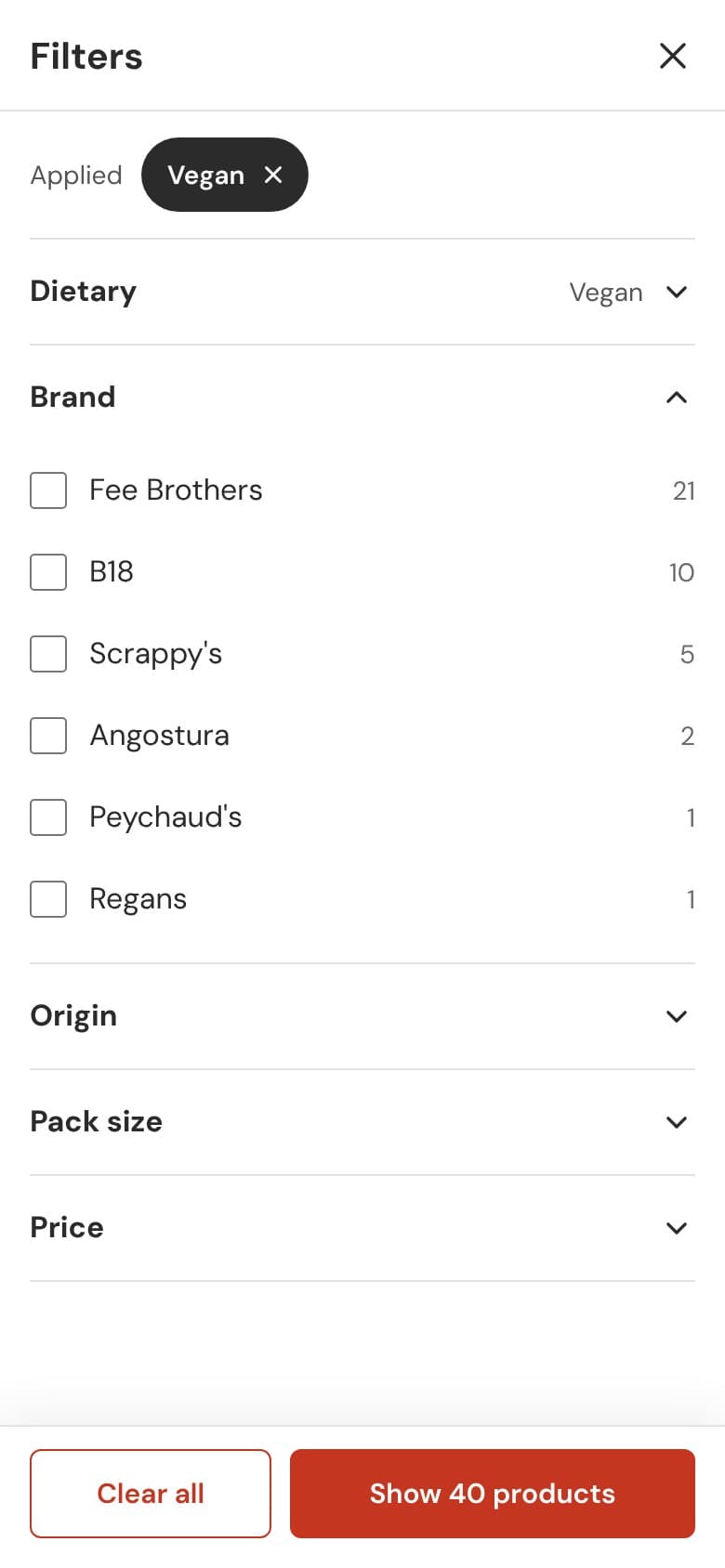
Filters open full screen, with the applied ones at the top and a button that says how many products remain: “Show 40 products”.
On the product page, the purchase comes before the description, which collapses into sections.
Text fields are 16 px or larger, so iOS doesn’t zoom in while typing.
Proposal
Listing
Filters
Product page
Formats and purchase
08 · The visual system
Color and typography with sufficient contrast
The current website uses the same orange, #FFA800, for buttons, brands and tabs, and in three of those uses it doesn’t reach minimum contrast: the white text on the home page buttons stays at 1.93:1, the brands on the cards at 1.89:1 and the active recipe tab at 1.85:1. For normal text, WCAG AA requires 4.5:1. The typography doesn’t help either: a single family, Geist, almost always between 14 and 16 px.
The proposal separates the headline color from the interaction color. Coral #E05A46 is reserved for large headlines, where 3:1 is enough. Buttons and links use a darker coral, #C53621, which reaches 5.35:1. Headlines move to DM Serif Display, and body text and interface to DM Sans.
Color
Coral
Coral#E05A46Large headlines.
Dark coral#C53621Buttons and links.
Peach
Peach#F5D0A4Wholesale access and footer labels.
Light peach#FBEBD8Boxes for professionals and savings badges.
Neutrals
Ink#2B2B2BText and featured band.
Grey#555555Secondary text and brands.
Light grey#F4F5F6Section backgrounds and dietary badges.
Charcoal#363636Footer.
Contrast, from the current website to the proposal
Element
Current website
Proposal
Primary button text
Aa
White on #FFA8001.93:1Fails
Aa
White on #C536215.35:1Passes
Brand on product cards
Aa
#FFA800 on #FFFCF81.89:1Fails
Aa
#555555 on white7.46:1Passes
Active element
Aa
Recipe tab: #FFA800 on #FAFAFA1.85:1Fails
Aa
Active subcategory: white on #2B2B2B14.16:1Passes
Coral #E05A46 gives 3.67:1 on white. That’s why it only appears in headlines of 24 px or more, where WCAG AA requires 3:1.
Typography
DM Serif Display gives the headlines the tone of a gourmet store; DM Sans keeps prices, formats and filters readable. Both are from Google Fonts.
Aa
DM Serif Display · Headlines · 400
Aa
DM Sans · Text and interface · 400, 500, 600, 700
Fee Brothers · 57 products
Aztec Chocolate Bitters
A dark chocolate bitters with hints of vanilla, heat and spice. Perfect for dark spirits, especially rums and tequilas.
09 · The proposal
What the proposal covers
11→ to 4category groups in the navigation
80→ to 46entries in Bitters
1.93→ to 5.35button text contrast
850→ to 419 pxto the first product on mobile
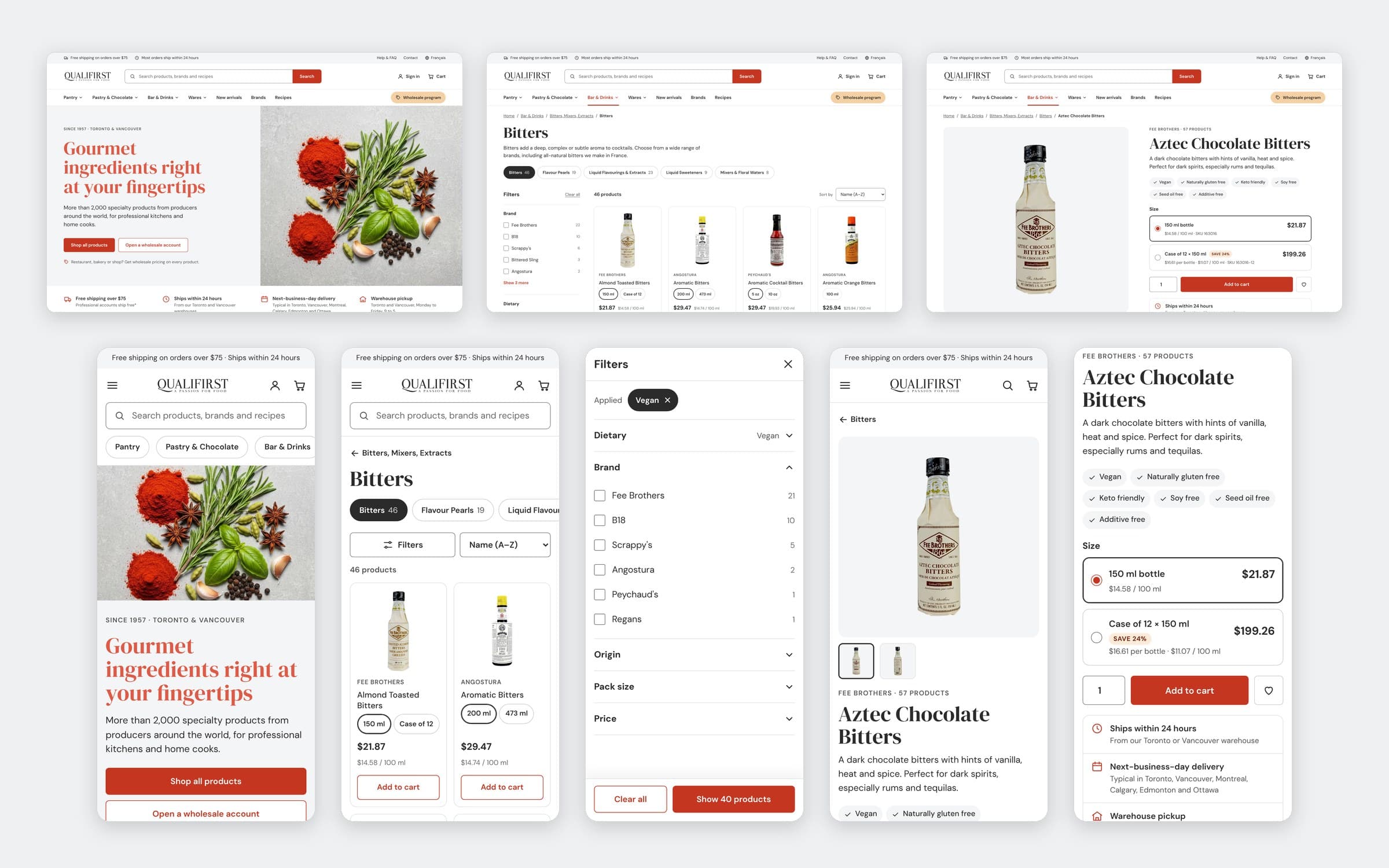
The proposal covers the home page, the menu, the listing with its filters and the product page, on desktop and mobile, with the store’s real products, prices, formats and terms. It was never implemented. Every decision answers a problem from the diagnosis.
Home page, listing and product page on desktop, and five mobile screens.
Senior Designer | Branding · Motion · UX · AI Production